Knowledge guide
Turn your website into a support knowledge base
Start with pages answering customer questions about delivery, returns, product use, and contact details. A focused set of current policies is easier to maintain.
Ouviro · Published
1. Choose content you can verify
Use an owner or admin account and record your website URL in a channel. Choose public pages you control, or approved support information in UTF-8 files.
Remove conflicting policies. Exclude private customer records, passwords, and API credentials. Order lookups belong in a separately authorized API tool.
2. Verify ownership before crawling
Adding a domain to a channel is not enough. Ouviro checks the homepage or the URL being added for your channel's installation code or the verification meta tag supplied by the dashboard.
If verification fails, publish the supplied tag in the page head and retry. It must be present in the HTML fetched from your site; a tag inserted only after JavaScript runs may not be visible to the crawler.
3. Import a page, a path, or a file
In Knowledge, add the website URL and choose a single page or the pages below that path. Start with a focused support section and review the discovered content.
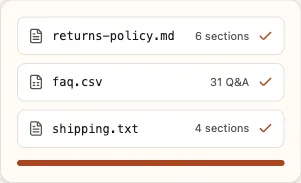
For files, upload .csv, .txt, or .md in UTF-8, up to 2 MB each. FAQ CSV files need question and answer columns with a nonempty value in both columns for every row.
4. Wait for indexing and publication
An accepted upload or a completed page-discovery job does not mean every source is ready to answer. Pages still need to be fetched, indexed, and published. Check individual source states and any error messages.
Publication happens after successful indexing. Retrieval uses the source's publishedVersion; an unpublished first version is unavailable. A previous published version can remain searchable while its replacement is being processed.
5. Test retrieval, then the actual answer
Use the knowledge search test with a question answered by an imported page. Read the passages and source titles; a similarity score alone does not prove success.
Ask the same question in your widget. Compare the reply with the policy and check any cited links. Website sources include their URL, but correct citations are not guaranteed.
6. Update content and check old versions
After changing a policy, request a recrawl and wait for publication. Routine recrawls also revisit websites; updates are not instantaneous. Reindexing a file processes its stored contents again. Changed text requires a corrected upload.
Retest and remove superseded sources when appropriate. A failed refresh or unreachable page can leave the last published content available.
7. Handle missing or unsupported answers
For missing passages, check ownership, crawl scope, page accessibility, source errors, and publication state. Pages whose useful text appears only after JavaScript runs may provide too little HTML to import.
If the published material does not support an answer, improve the source or use human support. Test that path explicitly; a plausible response is not evidence that the policy exists.